
Using GeoPhoto
Why are my photos or videos not showing on the map?
Check that the right folder or OneDrive folder has been added and selected, and that no date filter is hiding the files. Files without GPS data are available under Files without geotag until you add a location. If the folder is on an external or network drive, make sure it is connected and GeoPhoto can access it. Large folders can take a while to scan. Also check that the file extension is supported.
Which file formats are supported?
GeoPhoto can show media files with these extensions: .jpg, .jpeg, .png, .heic, .heif, .hif, .arw, .cr2, .cr3, .nef, .orf, .raf, .rw2, .rwl, .srw, .dng, .tif, .tiff, .mp4, .mov and .avi. For GPS tracks, GeoPhoto supports .gpx, .kml and .kmz files. If you are missing a format that supports geotags, please let me know by mail.
Can I geotag multiple files at once?
Yes. Open a grid view such as Files without geotag, select the files, choose Geotag, pick a map location and save.
Can GeoPhoto find a missing location by itself?
No. GeoPhoto needs a source: a location you choose manually or a GPX, KML or KMZ track recorded while the photos were taken.
Why do selected folders sometimes disappear?
If a selected folder is no longer available, for example because an external or network drive is disconnected, GeoPhoto removes it from the active list. Add it again when the drive is available.
Why are some actions unavailable in Photos mode on Mac?
GeoPhoto can edit locations in the Mac Photos library when Photos permission is granted. Some workflows, such as saving copies or track-based geotagging, need file access through Folder mode.
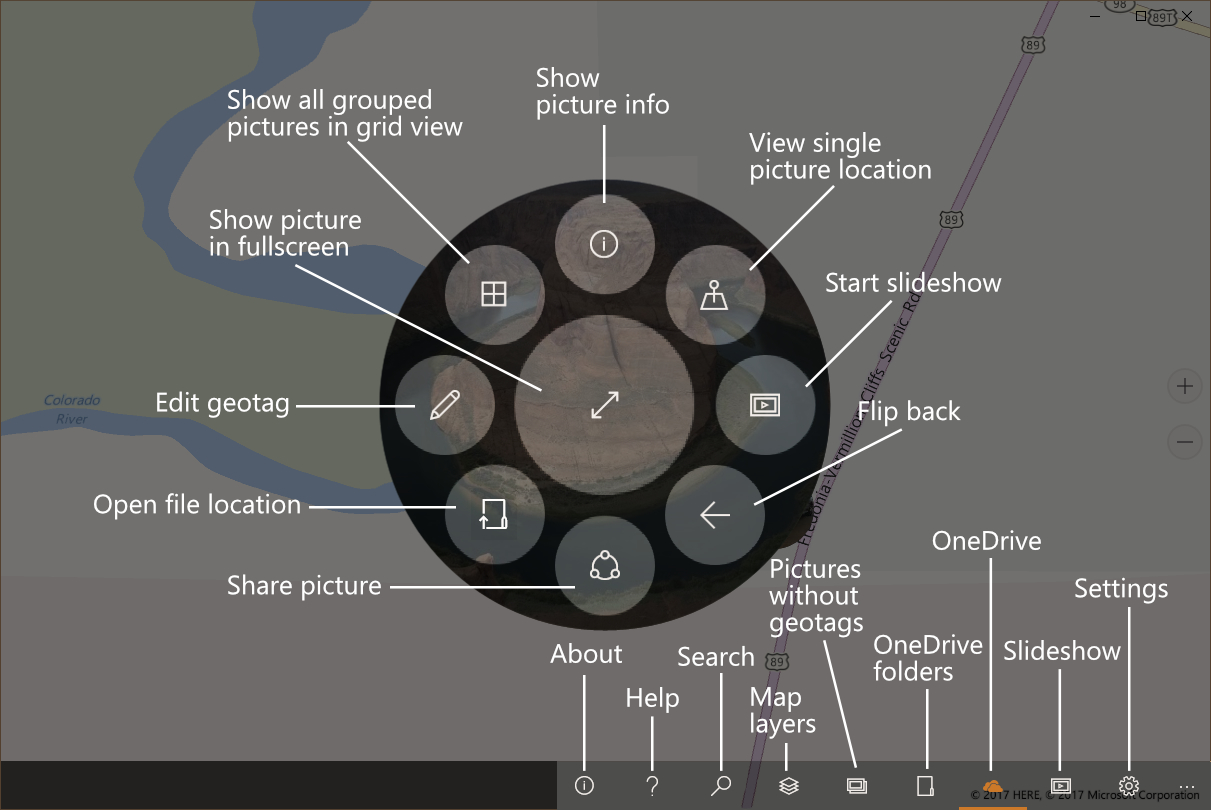
Button guide
The Windows app uses map pins, toolbar buttons and a radial menu around selected photos. This guide explains the most common actions.
Purchases and privacy
Is GeoPhoto free?
Yes. The free version lets you view photos and videos on the map and try geotagging. GeoPhoto Pro is for larger photo and video collections, unlimited geotagging and track-based workflows.
What does GeoPhoto Pro include?
GeoPhoto Pro lets you show larger photo and video collections on the map, unlocks unlimited manual geotagging, GPX/KML/KMZ track import for geotagging and GPX export.
What does SkyView on Windows include?
On Windows, SkyView is a subscription for satellite and hybrid map layers. It includes GeoPhoto Pro features while the subscription is active.
Does GeoPhoto upload my photos?
No. GeoPhoto does not upload your photo or video files. For more details, see the Privacy Policy.